Tutorial: llmPrompt
Course Schedule

Image: Live Chat Symbol Icon, AI Tools Icon Set, ChatGPT
We are building a live LLM agent from scratch using a two-part architecture: a mobile agent frontend and a back-end harness.
In this first tutorial, the mobile agent acts as a simple chatbot interface where you enter prompts,
and the back-end harness works as a straightforward proxy, routing traffic straight to-and-from an
LLM runner. As the model streams completions back, your mobile app will render the output token by
token, typewriter-style in real-time. The backend sends your prompt to various available free LLM
runners. If you have a paid subscription to a cloud-based LLM provider such as OpenAI/ChatGPT,
Anthropic/Claude, OpenRouter, etc. you can use it in addition. We will also show you how to host a
local LLM on an Ubuntu host.
We will add new features to both the harness and the agent every single tutorial. By the end of the term, the back-end harness will evolve to handle episodic memory, tool execution, semantic memory, and retrieval-augmented generation (RAG) with knowledge graph. Meanwhile, your mobile agent will transform into a dedicated control center used to manage the harness and to provide essential human-in-the-loop guardrails.
Note: through out the term, always treat messages you send to the harness and the LLM runner as public utterances without any reasonable expectation of privacy. Further, prompts sent to LLM runners will be used by the providers for various reasons set out in their “Terms of Service” they will have you agreed to when you sign up.
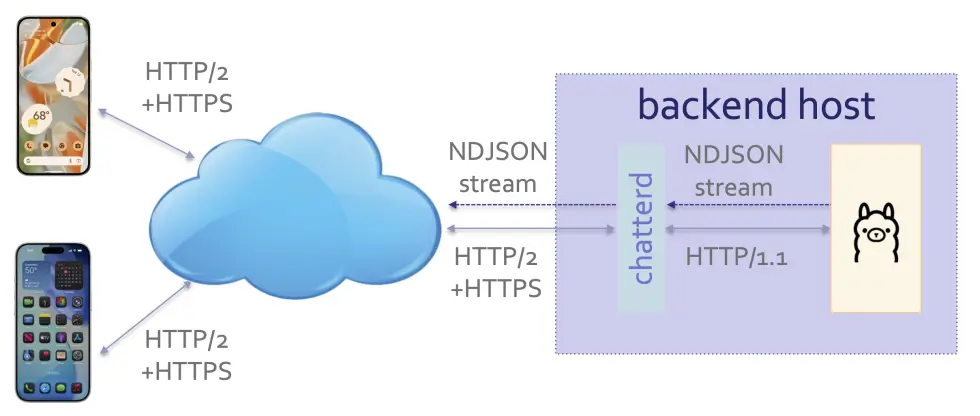
harnessd serving as HTTP/2 proxy for an LLM runner
About the Tutorials
All tutorials and projects in this course can be completed individually or in teams of up to two students. You are free to change partner for each assignment.
We do not assume any prior mobile, back-end, or LLM-assisted development experience on your part. We will start from the ground up by introducing you to the front-end integrated development environments (IDEs) and back-end development tools. You are welcome to use coding assistants (AI agents). However, you are responsible for understanding all covered material, and you must be able to defend all architectural and design choices during project evaluations.
Are the tutorials cumulative?
Yes, the tutorials and projects are all cumulative. We are building a single agent-and-harness system piece by piece over the term. By the end of the semester, you will have engineered a comprehensive, fully functional agentic AI system.
Because the tutorials require manual infrastructure configuration tailored to each student or team, including but not limited to individualized security certificates and API keys, we cannot provide ready-made reference solutions for download. If you encounter setup difficulties, please seek help from the teaching staff immediately.
For the ULCS (non-MDE) version of the course, each project is directly supported by two immediately preceding tutorials. For example, Tutorials 1 and 2 demonstrate how to accomplish the foundational tasks required for Project 1.
While the tutorials can largely be completed by cut-and-pasting code snippets from the specifications, you will be significantly more productive during project design and implementation if you actively understoodd the codebase. As a general rule of thumb: the less time you spend reading, the more time you will spend debugging.
Objectives
Front end:
- Familiarize yourself with the development environments
- Start learning Kotlin/Swift syntax and language features
- Learn declarative UI with reactive state management (Compose for Android, SwiftUI for iOS)
- Observe the unidirectional data flow architecture
- Install self-signed certificate on your mobile device
- Learn HTTP GET and POST asynchronous exchanges
- Learn JSON serialization/deserialization
- Process Server-Sent Event (SSE) stream
- Use reactive UI to display asynchronous events: display each streamed token as they arrive
- Learn how to connect a front-end agent with a back-end harness
Back end:
- Communicate with an LLM runner using OpenAI-compatible
/v1/chat/completionsAPI, JSON data format, and SSE streaming - Generate self-signed private key and its public key certificate
- Set up an HTTPS server with self-signed certificate
- Implement URL path routing
- Set up HTTP forwarding proxy
- Use JSON for HTTP request/response with both the LLM runner and your agent front end
- Optional: setup and run
llama-serveras a self-hosted LLM runner
API and protocol handshake
Our harness communicates with LLM runner using OpenAI-compatible /v1/chat/completions API. Being
the first API to popularize LLM, it has been become the industry de facto standard, supported not
only by OpenAI, but also Claude, Gemini, Perplexity, Grok, Qwen, Kimi, GLM, MiniMax, Mistral,
OpenRouter, Ollama, oMLX, and others (some with variations in the actual endpoint URL). It governs
the format of the JSON data sent to/from the LLM runner. It also governs how the SSE protocol is
used to stream the return completion.
For this tutorial, our back-end harness, harnessd (‘d’ for daemon as a long-running background
Unix process that acts as a server is usually called), has two APIs:
-
/: uses HTTP GET to check that the harness is up and running! -
/llmprompt: uses HTTP POST to post user’s prompt to the LLM runner.
Using the following syntax:
url-endpoint
-> request: data sent to harness
<- response: data sent to agent followed by HTTP Status
The protocol handshake consists of:
/
-> HTTP GET
<- "UM EECS Agentic harnessd" 200 OK

/llmprompt
-> HTTP POST { model, messages, stream }
<- { OpenAI's /v1/chat/completions SSE stream } 200 OK
Note: ‘/’ API is disabled on
mada.eecs.umich.eduto deter random probing.
Data format
To post a prompt to the harness using the llmprompt API, the front-end agent sends a JSON
object consisting of a model field, a messages field, and a stream field. The model field
holds the name of the model, for example gemma3:270m. The messages field carries an array of
JSON objects, whose content carries a prompt and role specifies the kind of prompt, whether it’s
a user prompt for the LLM to complete, or a system prompt giving the LLM instructions. The
stream field indicates whether the LLM runner should stream its response or to batch and send it
in one message. For example:
{
    "model": "gemma3:270m",
    "messages": [
        {
            "role": "user",
            "content": "howdy?"
        }
    ],
    "stream": true
}
Some models require
"max_tokens"to be listed as a top-level field in addition.
Upon receiving this JSON object, harnessd simply forwards it to an LLM runner. In this course, we
only work with streaming responses, so stream is always set to true and the reply from the LLM
runner is in the form of a SSE stream. The JSON objects carried in OpenAI’s /v1/chat/completions
API is specified in their Create chat
completion
document. In this tutorial, harnessd works as a straightforward proxy, it simply passes traffic
straight through. It does not accumulate and store traffic going either direction.
Specifications
There are TWO parts to this tutorial: a front-end mobile agent and a back-end harness. For the front end, you can build either for Android with Kotlin/Compose or for iOS in SwiftUI. For the back end, you can choose between these micro web frameworks: Echo (Go), Fastify (Typescript), Starlette (Python), or axum (Rust).
You only need to build one front-end agent, AND one of the alternative back-end harness.
Until you have a working harness of your own, you can use the one running on mada.eecs.umich.edu
to test your front end. To receive full credit, your agent MUST work with your own harness
and with the one on mada.eecs.umich.edu. Your harness can either connect to a cloud-based or a
self-hosted LLM. We have provided a list of LLM providers with free-tier access. You will need to
apply for an API key at the provider of your choice (usually no credit card required). We have also provided instructions on how to host a local LLM provider. Local
hosting is optional.
IMPORTANT: unless you plan to learn both the Android and iOS platforms, you should do all tutorials on the same platform as for your projects.
 There is a graded TODO item in the back-end spec that you must complete as part of the tutorial.
Prepared by Sugih Jamin | Last updated: June 21st, 2026
Acknowledgments: I used Gemini 3.5 Flash to proofread, refine the phrasing, and improve the stylistic flow of this document. All structural concepts, technical details, and final editorial decisions remain entirely my responsibility.